
When you update a property's rates in your property management software (PMS), rates will sync automatically to VacayHome Connect during the hourly rate sync. If you would like to update rates before the next sync, you can use the manual sync feature in the Property List and in the Property Overview to sync your rates on demand.
NOTE: Some property management software products do have an additional waiting period of up to 24 hours before updated rates are available to VacayHome Connect in the API. VacayHome Connect is only able to display the rate details that are available in the API.
Synching Rates
To sync a property's rates manually in your VacayHome Connect client portal, use the Sync rates option from the Property List.
- Click on Properties in the left-hand menu, to view your property list.
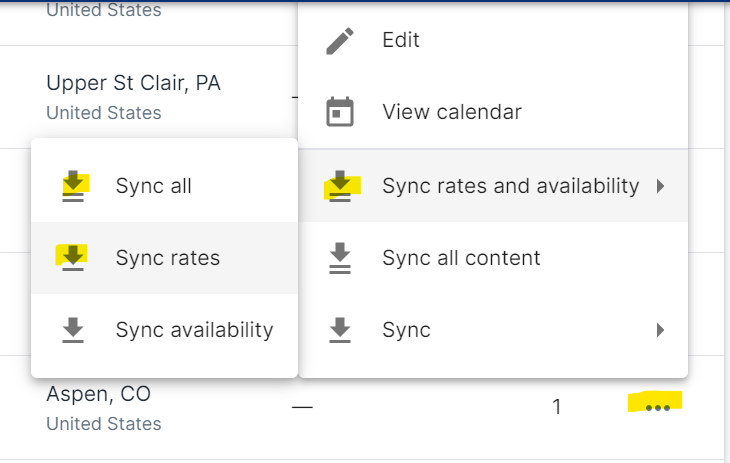
- Locate the property whose rates you would like to sync, and click on the three dots to the far right of the property information to open the edit and sync options.
- Go to Sync > Sync rates and availability > Sync rates to import the property's updated rates.
Comments
0 comments
Please sign in to leave a comment.